I went to a preserved railway with a visit to the signal box.
I wondered if I could use a micro controller to dong a bell and repeat the sequence as if the remote box repeated it.
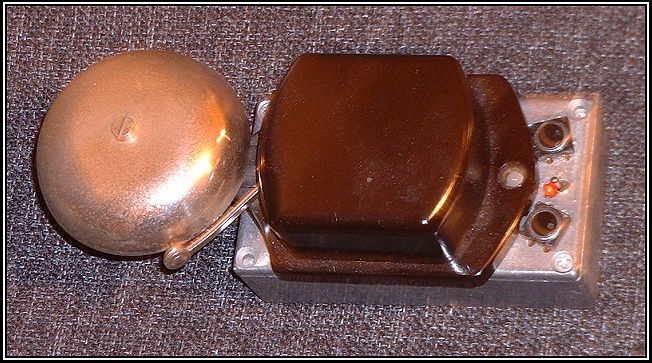
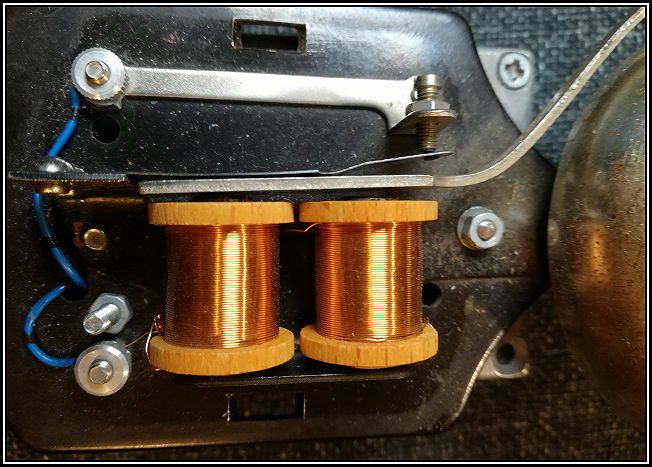
I did a house clearance and acquired a door bell with a good gong.
For my model railway I could use it to pretend to pass on the train to the next block.
It might not be prototypical, but it was good fun to try out.
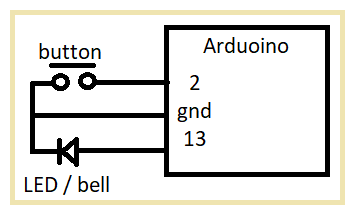
Press the button as if you are using the bell. It flashes the led and restarted the holdoff timer. When the holdoff timer matures the sequence is repeated. Wait till the sequence ends before using it again.
NOTE: click delay, then wait , then press holdoff delay to set holdoff delay.
== Using a PIC Chip.

There are two solutions that come to mind.

1) A delay line that echos back what I press.

2) A program to remember the key presses and interval between them,
and when I finish play back the sequence.

http://www.dougrice.plus.com/hp/Theory/bc001_asm.txt

Clear event
Add TMtsCount to Queue. TMtsCount incremented each Ts

TMbuttonPressed
		BCF		IPbuttonPressEvents, BUTTON_7

		BTFSS,	dotimeslice, RUN_HOLDOFFTMR
		CLRF	TMtsCount

		INCF	TMtsCount,W
		CALL	QUput
		CLRF	TMtsCount

		; Start Hold off Timer
		; Restart HoldOfTmr with 50 ticks
		MOVFW	TMholdOffDelayCounterInit
		MOVWF	TMholdOffDelayCounter

		BSf		dotimeslice, RUN_HOLDOFFTMR

		CALL	TMringBell
		RETURN

== Solution 2 - remember keypresses and intervals and play back sequence.

processes

 onKeyPress:
  Dong bell
  if timerTicks < MAX
    add timerTicks to end of queue
  reset timerTicks

 onTimer:
   increment timerTicks if timerTicks < MAX

;---------------------------------------------------------------
; SEC 1.0 - Variables
;---------------------------------------------------------------

		CBLOCK 0x20
			; 7 word queue
			QU_start
		ENDC

		CBLOCK 0x30
			dotimeslice
			RTN1_COUNT
			JumpTableTemp

			; polled input stuff
			IPnewF
			IPlastF
			IPbuttonPressEvents
			IPbuttonReleaseEvents

			; queue variables.
			QUinPtr
			QUoutPtr
			QUtemp

			; Timers
			TMnextDelayCounter			; Hold Off delay
			TMholdOffDelayCounter		; Hold off count
			TMholdOffDelayCounterInit	; Hold off count

			TMringBellDelay			; Hold RingBell Output on for thid delay
			TMtsCount					; incremented every tick, reset on button press.
Hover over the circle to set the duration of the holdoff time.
This example uses the HTML DOM to assign an "onkeydown" event to an input element.
Press a key inside the text field to set a red background color.
NOTE: The keyboard repeat keys complicate using this as the keydown and key up events are relative to the repeated key emit, not the finger on the key. You can use Mouse over.