
================================== FILTER: F5 - Elmers CONF: NTELITE, F5 solwise715 + housewiring + decor on hook + dect on hook LOG FILE: adsl_f5_c2.log

This page reports that when I disconnected the Bell wire at my master socket faceplate, My ADSL connection downloads went from a disappointing 136 kbs to a very acceptable 5250 kbs.
My ADSL download has been disappointing since my line was MaxDSL'd. I have reported the fault to my ISP, and was told to directly connect the modem to the master socket.
When I did a direct connection a few years ago, I got 5000/448 DownStream/Upstream, but with the extensions connected, I got about 3904/448, which decreased over a week.
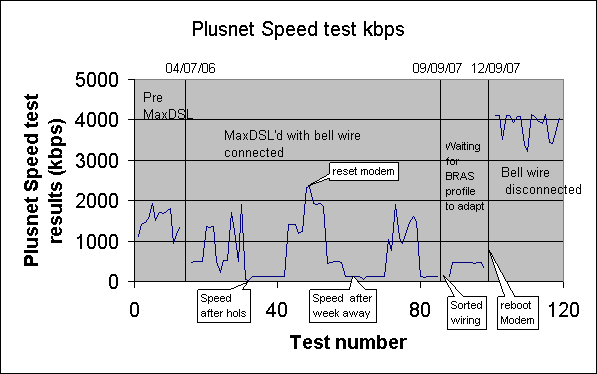
Here are Plusnet some speed tests plotted before and after the disconnection. It was over 1000 kbps before MAXdsl
Since I was MAXdsl'd it has been bouncing around 800 kbps mostly 500 kbps, and maybe upto 1800kbps for a while after rebooting the modem. When I got back from holiday, my download speeds were down to 136kbps. Rebooting the modem made no difference. Time to sort out the wiring!
Before considering the move of the ADSL modem down besides the master socket, I thought I would try and see if the filters were at fault.
BT speed test reports: - Very disappointing download, given the DownStream is 3648 kbps
 07/09/2007
================
Test1 comprises of Best Effort Test:  -provides background information.
    IP profile for your line is - 135 kbps
    DSL connection rate: 448 kbps(UP-STREAM)  3648 kbps(DOWN-STREAM)
    Actual IP throughput achieved during the test was - 117 kbps

If you wish to discuss these results please contact your ISP.

If you are experiencing problems with specific applications, servers or websites please contact your ISP for assistance.
During my testing, I noticed that the Solwise Microfilters only had two wires
Only two of the pins are connected
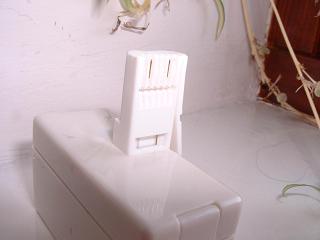
However three are connected in the Telephone socket
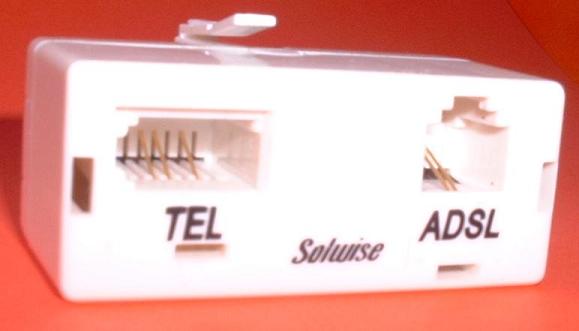
I thought "Why do I need to extend all the wires to the extension, when the filter only uses two? What happens if I only connect the ones used?
At the master socket faceplate I only connect the BlueWhite/WhiteBlue pair to IDC connector pins 2 & 5.
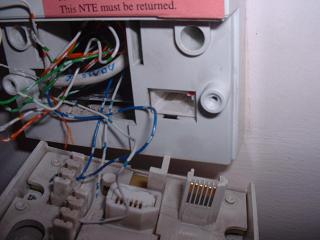
House Wiring Pre ADSL:
The Master socket is connected to the slave sockets using BT 6 wire, 3 twisted pair telephone cable as installed when the house was built in about 1991.
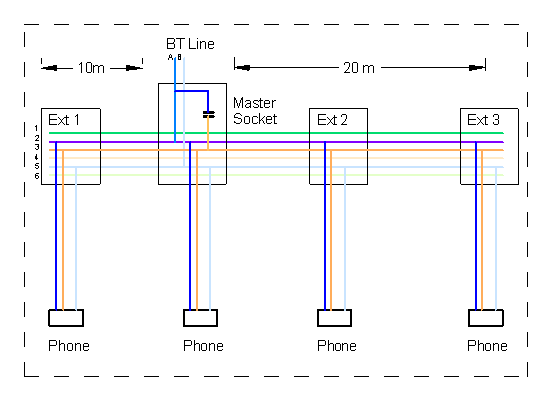
The logical wiring is shown below. The orange Bell wire is connected to the B wire via a capacitor. At long exchange line lengths, there is an appreciable impedance. This could be 168 Ohms/km and 50nF /km, see BT SIN 351 .
What this means is that the bell wire acts as an aerial, both as a transmitter and receiver removing and adding power to the B wire. This will unbalance the ADSL signal which is sent as a balanced signal on the A and B wire. The ADSL signal has 256 bands. Each band is 4.3125 kHz wide so the signal spans 0 to 1104 kHz ( I think! ) My Medium Wave radio tunes across 540 kHz to 1600 kHz.

House Wiring - ADSL with my fault - Bell wire connected at master socket, but not actually used:
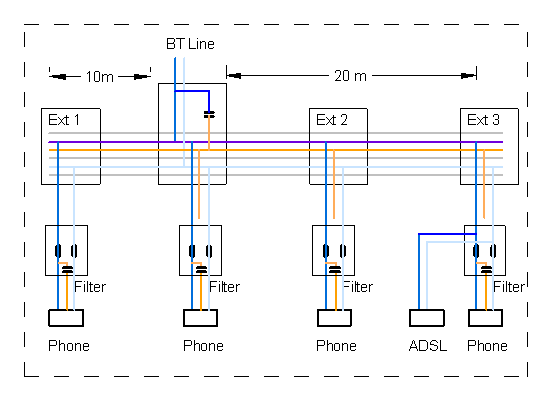
The Bell is connected to the B wire via the 1uF capacitor, which then runs in parallel to the twisted pair carrying the A & B wires to the slave sockets.
Within the master socket, the Bell is connected to the B wire via the 1uF capacitor, which then runs in parallel to the twisted pair carrying the A & B wires to the slave sockets. I guess it acts as an aerial and either picks up interference, or transmits interference, which affects the ADSL signal on the A & B wires.
The ADSL Channels above channel 128 are all over the place. See Spectrogram further down this web page.
With all six wires connected, ADSL SHOW CHANNEL reports:
LOG FILE: adsl_f3_c3.log CONF: NTELITE, Unfiltered Housewiring ( all six wires ) , F3 solwise715+decor

Typical: http://www.speedtester.bt.com/ results: ( also over wireless 801.B !)
06/09/2007
===========

Test1 comprises of Best Effort Test:  -provides background information.
    IP profile for your line is - 135 kbps
    DSL connection rate: 448 kbps(UP-STREAM)  3520 kbps(DOWN-STREAM)
    Actual IP throughput achieved during the test was - 110 kbps

If you wish to discuss these results please contact your ISP.

If you are experiencing problems with specific applications, servers or websites please contact your ISP for assistance.

Your test has completed please close this window to exit the performance tester.

26/08/2007
============
Test1 comprises of Best Effort Test:  -provides background information.
    IP profile for your line is - 135 kbps
    DSL connection rate: 448 kbps(UP-STREAM)  3904 kbps(DOWN-STREAM)
    Actual IP throughput achieved during the test was - 121 kbps

If you wish to discuss these results please contact your ISP.

If you are experiencing problems with specific applications, servers or websites please contact your ISP for assistance.

Your test has completed please close this window to exit the performance tester.
House Wiring ADSL after this fix - Bell wire disconnected at master socket, and filters providing filtered bell wire:
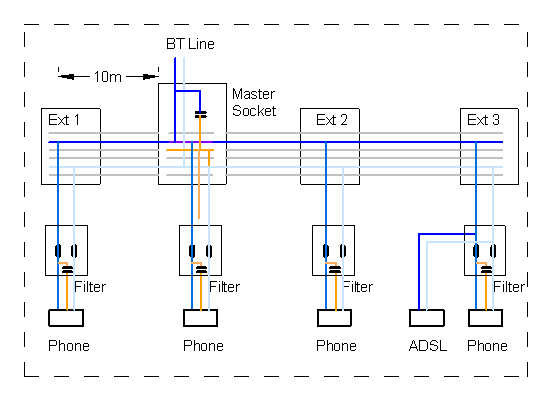
With only the BlueWhite/WhiteBlue pair connected to IDC connector pins 2 & 5, ADSL SHOW CHANNEL reports:
LOG FILE: adsl_f3_c4.log CONF: NTELITE, F3 solwise715+ Housewiring filter via F3

http://www.speedtester.bt.com/ results: ( also over wireless 801.B !)
This is the same as when I plugged the modem directly into the Master Socket, with the house wiring disconnected, as recommended by Plusnet.
LOG FILE: adsl_f3_c2.log CONF: NTELITE, F3 solwise715+decor

http://www.speedtester.bt.com/ results: ( also over wireless 801.B !)
13/09/2007
================
This was tested end to end over the wireless. I rebooted the eTEC ADSL modem last night and on my Fulisu got over 5M bits per second.

Test1 comprises of Best Effort Test:  -provides background information.
    IP profile for your line is - 4500 kbps
    DSL connection rate: 448 kbps(UP-STREAM)  5312 kbps(DOWN-STREAM)
    Actual IP throughput achieved during the test was - 3768 kbps

If you wish to discuss these results please contact your ISP.

If you are experiencing problems with specific applications, servers or websites please contact your ISP for assistance.
Simply disconnecting the OrangeWhite/WhiteOrange pair from pins 3,4 at the master socket improved my Broadband download speed.
The Bell wire was connected to the B wire via the 1uF capacitor, which then runs in parallel to the twisted pair carrying the A & B wires to the slave sockets. It acts as an aerial sucking out power from the B wire and adding noise from received signals.
Even if you use filters at each socket, the bell wire may still be distributed unfiltered to the slave sockets.
You do need to get the correct type of Micro Filter, they are not all the same circuits. Some feed the bell wire straight through, others have a bell capacitor after the inductors.
My survey of the local hardware shops suggest that you have to be very careful when buying a filter.
Currently they are selling a filter that feeds the Bell Wire straight throughand all are CE marked.
However, No local hardware shop sold filtered faceplates sockets that allowed you to distribute the bell wire filtered as suggested in the SIN 346.
Currently, You cannot buy from local shops, a solution that would get my ADSL to work! I will keep using my Solwise Micro filters.
This tip is in the BT SIN 346 suppliers information note in paragraph 7.3
I am delighted. My two year saga of support questions getting an answer that did not quite tell me the solution is over!
Remember - the extension wiring is your responsibility, not BT's or your Broadband Provider.
Here is a plot of some speed tests I have logged eratically over the last two years. The tests over the last two weeks are on the right. After I fixed the wiring,rebooted the modem on the 09/09/2007, and my BRAS profile was realigned on the 12/09/2007 The speed tests have been spectacular, even over an 801.b wireless link.
STOP PRESS ( 19/10/2007): I rang 151 and 150 to try and get BT to fit me a proper filtered master socket, and failed to find anybody who could help. On my way home, I drove past an Openreach van parked up. I spoke to the chap driving it. I explained my problem and desire to obtain a filtered faceplate.
He gave me an NTE5A, which he said was standard issue. I traced the circuit and noticed that it has an inductor in series with the Bell wire to filter it. This is just what I am looking for!!!!
So BT Openreach are now fitting a faceplate that filters the bell wire. It will work with the micro filters currently available from Maplin and B&Q.
The leaflet that came with it clearly stated "This linebox is the property of British Telecom and contains components which ensure the correct working of your line"!
STOP PRESS ( 02/11/2007): I spoke to another person who said he had a Master socket. it was also labled NTE5A. However, it did not have the inductor mentioned above. This would not work.
Tescos were selling micro filters. Some had 4 wires to the plug, These may not ring the phone if you disconnect the Orange/White bell wire. They are also selling a Microfilter with blue writing on the front. It has two wires connected to the plug. Therefore I think these WOULD ring the bell if you diconnected the bell wire.
In old houses, the Mastersocket may not be up to the job for highspeed ADSL, and will need an upgrade, if you live far away from the exchange and have long extension housewiring. This page may help.
A technical simulation of Multiple Path effects of Frequency response: that has some simularties.
If you have found this useful or want to make a comment please add to my blog: ADSL BLOG
BT Supplier's Information Note for ADSL - SIN346 | Plusnet's help on Wiring | Plusnet's Get Ready for High-speed Broadband | Wiring detail | Interesting related blog | ADSL Microfilters | ADSL filters explained | Improving your BT Line based Broadband Speed - Cut the Bellwire! | United Kingdom internal phone systems Re-wiring
Below is a spectrogram of the results of ADSL SHOW CHANNEL obtained fron my Solwise 715 ADSL router. I have Perl and TeraTerm scripts to poll the ADSL modem each time I turned on my PC and when I wanted. This was collected over a period of a year.
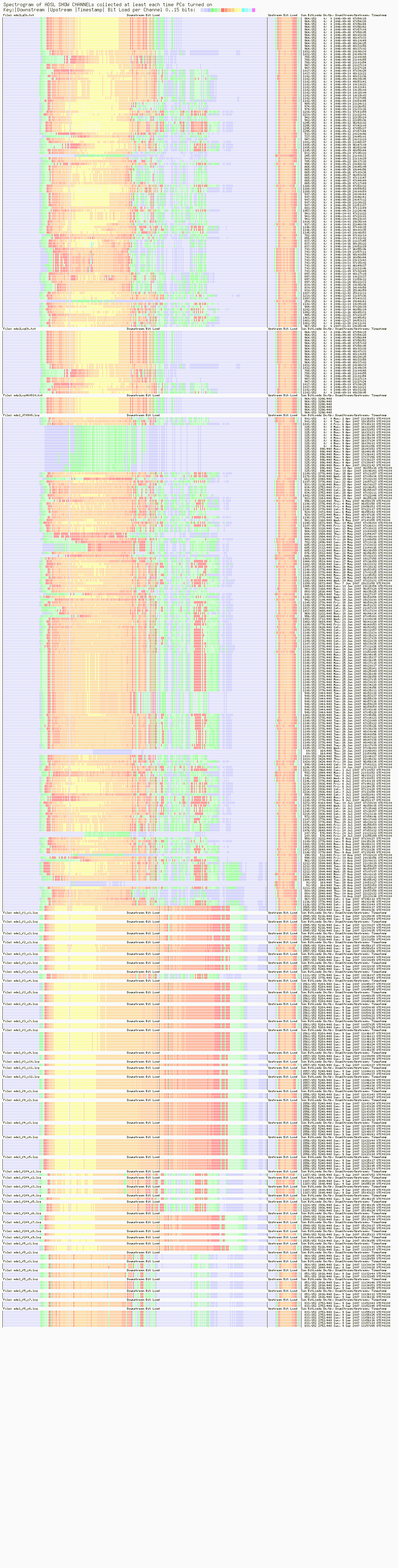
One night, I took my Solwise 715 ADSL modem route and portable computer, mains extension leads, and CAT 5 cables downstairs into the sitting room ( lounge ) when the wife was out. At the time I could log into my modem and do a ADSL SHOW CHANNEL command, but did not understand what it meant, or plot it.
With the modem directly plugged into the socket that the face plate plugs into.

With the modem plugged into the faceplate of the master socket with poor house wiring. Wiring used a normal extension lead and some 6 wire extension.


With the modem plugged into the faceplate of the master socket with poor house wiring. With Bedroom extension unplugged.

I knew I had a problem with my house wiring, but did not really know a simple way of fixing it. Anyway, I could get about 500kbps download, which I could live with.
Previous speed test results:

Date Speed Achieved (kbps)
07-08-2007 07:03:52 112.1
06-08-2007 22:01:17 131.8
06-08-2007 22:00:46 131.9
06-08-2007 22:00:02 131.6
06-08-2007 21:58:52 131
06-08-2007 06:57:19 131.4
06-08-2007 06:56:45 130.4
05-08-2007 19:24:46 132
05-08-2007 17:32:35 131.7
05-08-2007 17:32:08 134.1
05-08-2007 17:27:46 20.5
05-08-2007 17:26:07 37.8
14-07-2007 07:41:50 1909.7
30-06-2007 16:04:00 485.3
26-06-2007 21:01:59 1235.1
23-06-2007 08:34:51 1705.5
13-04-2007 08:27:18 521.2
13-04-2007 08:14:57 512.1
11-04-2007 22:41:44 233.3
12-03-2007 21:00:31 483.4

I have been getting poor speed tests lately! Here is my log:

Previous speed test results:

Date Speed Achieved (kbps)
10-07-2006 07:36:49 1364.5
10-07-2006 07:28:33 1343.4
10-07-2006 07:27:56 1358.2
05-07-2006 22:53:01 483.9
05-07-2006 22:51:38 484.1
05-07-2006 22:51:04 484.7
05-07-2006 22:50:32 477.5
04-07-2006 21:25:35 1351.6   --- I think I must have been MaxDSL'd here.
04-07-2006 21:25:09 1233.5
18-06-2006 07:43:47 946.9
29-04-2006 21:44:03 1804.3
29-04-2006 21:43:28 1728.3
13-04-2006 22:08:58 1678
13-04-2006 22:08:28 1717
13-04-2006 22:08:01 1506.4
08-02-2006 08:05:22 1920
20-10-2005 22:13:20 1569.5
13-10-2005 20:18:03 1460.7
13-10-2005 20:17:27 1412.1
10-10-2005 21:38:10 1113.6
I brought this filter from a local hardware shop. A scan of a DIY shed suggested their's were also similar. It has a CE mark.
==================================
FILTER: F5 - Elmers - PhonaPart ADSL/Broadband filter LJ5109/BP
CONF: NTELITE, F5 solwise715
LOG FILE: adsl_f5_c1.log


==================================
FILTER: F5 - Elmers
CONF: NTELITE, F5 solwise715 + housewiring + decor on hook  + dect on hook
LOG FILE: adsl_f5_c2.log
ADSL tests
==================
Sunday 9th September 2007
configuration:
Line connected to NTELITE master socket.
NTELITE Fx to solwise715
Line connected to NTELITE master socket.
NTELITE Fx to solwise 715 + decor 310
Line connected to NTELITE master socket.
Then with house wiring:
NTELITE to filter F4 to DECOR310
NTELITE to study to filter F3 to dect
and
NTELITE to Bedroom to bedroom to filter F2 to solwise 715 and converse 300 + ADSL:SOLWISE
==================================
FILTER:
CONF:
notation:
NTELITE: Fx
NTELITE: Fx DECOR.
NTELITE: Fx , study: nc, bedroom nc, bedroom nc
NTELITE: Fx , study: Fx DECT, bedroom nc, bedroom nc
Tests plugged directly into master socket
Test
for each filter {
Directly connect Solwise to NTELITE, via
}
for each filter {
Directly connect Solwise to NTELITE, via
measure using adsl.pl
}
Solwise EL715
Test Solwise filters:
I have:
F1 Solwise spare
F2 Solwise in yellow bedroom
F3 Solwise in study
F4 Solwise in master socket
F5 Elmers ADSL micro filter .
Current configuration 13/09/2007
Master Socket F4 BT Decor 310
Study F3 DECT phone
Yellow Bedroom F2 eTec ADSL modem + Converse 300
==================================
FILTER: F2,F4,F3
CONF: NTELITE, House wiring Six Wires, F4 Decor, to study F3 Dect, to Bedroom F2, to solwise715 and Converse
LOG FILE: adslLgCh.txt - TeraTerm Log file collected over last two years
LOG FILE: adslLogCh.txt - TeraTerm Log file collected over last two years
LOG FILE: adslLog060910.txt - Perl Script capture collected over last year.
LOG FILE: adslLog070909.txt - Perl Script capture collected over last year.
LOG FILE: adslLog070909.txt - Perl Script capture collected over last year.
==================================
FILTER: F3
CONF: NTELITE, F3 solwise715
LOG FILE: adsl_f3_c1.log

==================================
FILTER: F3
CONF: NTELITE, F3 solwise715+decor
LOG FILE: adsl_f3_c2.log

==================================
FILTER: F3
CONF: NTELITE, Unfiltered Housewiring ( all six wires ) , F3 solwise715+decor
LOG FILE: adsl_f3_c3.log

==================================
FILTER: F3
CONF: NTELITE, F3 solwise715+ Housewiring filter via F3
LOG FILE: adsl_f3_c4.log

==================================
FILTER: F3
CONF: NTELITE, F3 solwise715+ Housewiring filter via F3 + decor On hook
LOG FILE: adsl_f3_c5.log
==================================
FILTER: F3
CONF: NTELITE, F3 solwise715+ Housewiring filter via F3 + decor off hook doing 1571
LOG FILE: adsl_f3_c6.log
==================================
FILTER: F3
CONF: NTELITE, F3 solwise715+ Housewiring filter via F3 + decor on hook + dect on hook
LOG FILE: adsl_f3_c7.log
==================================
FILTER: F3
CONF: NTELITE, F3 solwise715+ Housewiring filter via F3 + decor on hook + dect off hook doing 1571
LOG FILE: adsl_f3_c8.log
==================================
FILTER: F5 - Elmers - PhonaPart ADSL/Broadband filter LJ5109/BP
CONF: NTELITE, F5 solwise715
LOG FILE: adsl_f5_c1.log
==================================
FILTER: F5 - Elmers
CONF: NTELITE, F5 solwise715 + housewiring + decor on hook + dect on hook
LOG FILE: adsl_f5_c2.log
==================================
FILTER: F5 - Elmers
CONF: NTELITE, F5 solwise715 + housewiring + decor on hook + dect on hook repeat
LOG FILE: adsl_f5_c3.log
==================================
FILTER: F5 - Elmers
CONF: NTELITE, F5 solwise715 + housewiring + decor on hook + dect on hook repeat after a reboot.
LOG FILE: adsl_f5_c4.log
==================================
FILTER: F5 - Elmers
CONF: NTELITE, F5 solwise715 + repeat - slow train up speed.
LOG FILE: adsl_f5_c5.log
==================================
FILTER: F5 - Elmers
CONF: NTELITE, F5 solwise715 + repeat - slow train up speed.
LOG FILE: adsl_f5_c5.log
==================================
FILTER: F3
CONF: NTELITE, F3 solwise715 repeat - slow train up speed. Using F3 again.
LOG FILE: adsl_f3_c9.log
==================================
FILTER: F3
CONF: NTELITE, F3 solwise715 repeat - slow train up speed. Using F3 again.
LOG FILE: adsl_f3_c10.log
==================================
FILTER: F3
CONF: NTELITE, F3 solwise715 repeat + housewiring + dect + decor on hook.
LOG FILE: adsl_f3_c11.log
==================================
FILTER: F3
CONF: NTELITE, F3 solwise715 repeat + housewiring + dect + decor both off hook listening to 1571
LOG FILE: adsl_f3_c12.log
==================================
FILTER: F5 - Elmers
CONF: NTELITE, F5 solwise715 + housewiring + decor on hook + dect on hook repeat after using F5 - 2752 Kbps
LOG FILE: adsl_f5_c7.log
==================================
FILTER: F5 - Elmers
CONF: NTELITE, F5 solwise715 + housewiring + decor off hook + dect off hook + converse on hook repeat after using F3 - doing 1571 got:2752 Kbps
LOG FILE: adsl_f5_c8.log
==================================
FILTER: F4
CONF: NTELITE, F4 solwise715 repeat + housewiring + converse on hook dect on hook decor on hook
LOG FILE: adsl_f4_c1.log
==================================
FILTER: F4
CONF: NTELITE, F4 solwise715 repeat + housewiring + converse on hook dect + decor both off hook listening to 1571
LOG FILE: adsl_f4_c2.log
==================================
FILTER: F4
CONF: NTELITE, F4 solwise715 repeat + housewiring + converse off hook dect on hooh + decor on hook hook listening to 1571
LOG FILE: adsl_f4_c3.log
==================================
FILTER: F4
CONF: NTELITE, F4 solwise715 repeat + housewiring + converse on hook + dect on hook + decor on hook during incoming ringing. 5248 Kbps
LOG FILE: adsl_f4_c4.log
==================================
FILTER: F4
CONF: NTELITE, F4 solwise715 repeat + housewiring + converse on hook + dect on hook + decor on hook during incoming ringing. 5248 Kbps
LOG FILE: adsl_f4_c5.log
==================================
FILTER: F1
CONF: NTELITE, F1 solwise715 repeat + housewiring + converse on hook + dect on hook + decor on hook
LOG FILE: adsl_f1_c1.log
==================================
FILTER: F1
CONF: NTELITE, F1 solwise715 repeat + housewiring + converse on hook + dect on hook + decor on hook
LOG FILE: adsl_f1_c2.log
==================================
FILTER: F1
CONF: NTELITE, F1 solwise715 repeat + housewiring + converse on hook + dect on hook + decor on hook
LOG FILE: adsl_f1_c3.log
==================================
FILTER: F2 - yellow bedroom, F4 Decor to Master socket faceplate
CONF: NTELITE, F2 solwise715 housewiring minus study + F4 + decor on hook
LOG FILE: adsl_f2f4_c1.log
==================================
FILTER: F2 - yellow bedroom,F4 Decor to Master socket faceplate
CONF: NTELITE, F2 solwise715 housewiring minus study + F4 + decor on hook
LOG FILE: adsl_f2f4_c2.log
==================================
FILTER: F2 - yellow bedroom,F4 Decor to Master socket faceplate
CONF: NTELITE, F2 solwise715 housewiring minus study + F4 + decor on hook
LOG FILE: adsl_f2f4_c3.log
==================================
FILTER: F2 - yellow bedroom
CONF: NTELITE, F2 solwise715 housewiring minus study and no phones.
LOG FILE: adsl_f2f4_c4.log
==================================
FILTER: F2 - yellow bedroom
CONF: NTELITE, F2 solwise715 housewiring minus study and no phones.
LOG FILE: adsl_f2f4_c5.log
==================================
FILTER: F2 - yellow bedroom
CONF: NTELITE, F2 solwise715 housewiring minus study and no phones. Only blueW & WBl wires
LOG FILE: adsl_f2f4_c6.log
==================================
FILTER: F2 - yellow bedroom,F4 Decor to Master socket faceplate
CONF: NTELITE, F2 solwise715 housewiring minus study and no phones. Only blueW & WBl wires + F4 decor 5216 Kbps !!!!!!
LOG FILE: adsl_f2f4_c7.log
==================================
FILTER: F2 - yellow bedroom,F4 Decor to Master socket faceplate
CONF: NTELITE, house wiring just 2,3 blWt & WtBl study F2 solwise715 + converse Only blueW & WBl wires + F4 decor 5216 Kbps !!!!!!
LOG FILE: adsl_f2f4_c8.log
==================================
FILTER: F2 - yellow bedroom,F4 Decor to Master socket faceplate
CONF: NTELITE, house wiring just 2,3 blWt & WtBl study F2 solwise715 + converse Only blueW & WBl wires + F4 decor 5216 Kbps !!!!!!
LOG FILE: adsl_f2f4_c9.log
Below is a spectrogram of the results of ADSL SHOW CHANNEL obtained fron my Solwise 715 ADSL router. I have Perl and TeraTerm scripts to poll the ADSL modem each time I turned on my PC and when I wanted.
adslGD.lua a hacked script to plot ADSL SHOW CHANNEL
adslGDspec.lua a hacked script to plot ADSL SHOW CHANNEL as a spectrogram
See:
 lua
lua license
lua
lua license
 lua GD
lua license
for downloads.
lua GD
lua license
for downloads.
Below is a perl script to telnet onto my Solwise 715 and run ADSL SHOW CHANNEL.
adsl.pl a script to telnet onto ADSL Solwise 715 router